ChatGPT
 Claude
 Gemini
 Grok
How to Build a White-Label Taxi Booking App: A Complete Guide

TLDR
A white-label taxi booking app is a pre-built ride-hailing platform that a taxi company or mobility startup licenses and runs under its own brand. It usually includes a rider app, a driver (captain) app, a dispatch console and an admin panel. The build process has seven steps: pick your market and model, choose a platform, configure fares and zones, brand the apps, onboard drivers, test in one city, then launch and scale. A white-label taxi platform typically goes live in 4 to 6 weeks, compared with 6 to 12 months for a custom build, and costs a fraction of the upfront spend. The software is the faster part. Driver supply, local permits and fair pricing decide whether riders come back.
What is a white-label taxi booking app?
A white-label taxi booking app is ride-hailing software built once by a technology provider and licensed to many operators. Each operator publishes it under its own name, logo, colours and domain. Riders and drivers see only the operator’s brand. The provider maintains the core engine, while the operator runs the business and owns its customers.
Who uses it. Existing taxi and cab companies use white-label apps to move phone and street-hail bookings online. Startups use them to launch a local ride-hailing brand without a large engineering team. Fleet owners, airport transfer firms, corporate transport operators and bike taxi services use the same model.
How it differs from an “Uber clone”. A clone script is a one-time copy of source code that you host, fix and update yourself. A white-label platform is a maintained product. The provider ships updates, keeps the apps compliant with app store rules and handles infrastructure, depending on the plan you choose. The downside of white-label is less control over the core code than a fully custom build.
What “white-label” does not mean. It does not mean shared branding or a marketplace you join. The apps are listed under your developer accounts, and the rider, trip and driver data belong to you. Check that both points are written into any contract before you sign.
How does a taxi booking app work?
A taxi booking app moves every trip through six states: requested, matched, arriving, on trip, completed and settled. The rider app captures the request and shows an upfront fare. The engine matches a nearby driver. The driver app runs pickup and the ride, and the admin console settles payment, commission and driver payout.
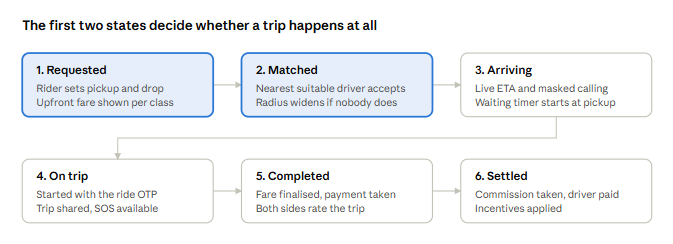
Most cancellations happen between the first two states, which is why fast matching and enough nearby drivers matter more than any single feature.
Which apps and panels does a taxi booking platform need?
A working taxi platform needs at least four connected surfaces: a rider app to book trips, a driver app to accept and complete them, a dispatch and admin console to run operations, and a back-end engine that handles matching, pricing and payments. Larger operators add a fleet owner portal and a corporate booking portal.
Rider app (iOS, Android and web). Passengers use it to set pickup and drop points, choose a vehicle class, see an upfront fare, track the driver, pay and rate the trip. You need it at launch.
Driver app (iOS and Android). Drivers, often called captains, use it to go online, accept requests, navigate, start the trip with an OTP, record waiting time and check earnings. You need it at launch.
Dispatch and admin console (web). Your operations team uses it to watch a live map, dispatch phone bookings manually, set fare cards and surge rules, approve drivers, issue refunds, run payouts and pull reports. You need it at launch.
Core engine (server). It runs in the background and handles matching, fare calculation, geofenced zones, payments, notifications and trip records. Every other surface depends on it.
Fleet owner portal (web). Owners who run several vehicles use it to assign cars to drivers, track documents, split earnings and receive payouts. Add it if you work with fleet owners.
Corporate portal (web). Business clients use it to manage employee accounts, travel policies and cost centres, and to receive one monthly invoice. Add it when you start selling B2B rides.
Safety console (web). Your safety or support desk uses it to handle the SOS queue, route deviation alerts and trip replays for disputes. It is strongly advised from day one.
Start with the first four. Add the fleet and corporate portals when that revenue is real. Each extra surface adds training, testing and support work for your team.
What features must a taxi booking app have at launch?
A taxi app needs fast matching, an upfront fare, live tracking, safe trip start and flexible payments on day one. Riders judge the service on the first booking. If the fare changes at drop-off, the car takes too long to arrive or the trip feels unsafe, they switch apps and rarely return.
Rider app features
Upfront fare by vehicle class. Show the price for each class, including any surge, before the rider confirms. The fare should change only for route changes, extra stops, tolls or waiting time.
Smart pickup pins and saved places. Snap the pickup point to a spot where cars can stop. Keep home, work and recent places one tap away.
Live driver tracking. Show the driver’s name, car, plate number and a live ETA. Use masked calling so neither side sees the other’s phone number.
Scheduled rides. Let riders book ahead for airport runs and early starts, with a driver assigned shortly before pickup.
Payments that fit the market. Cards and wallets everywhere, UPI in India, and cash in many emerging markets. Cash rides must reconcile against the driver’s balance automatically.
Driver app features
Request card with full context. Show pickup distance, estimated fare and drop area before the driver accepts. Hidden details lead to more cancellations after matching.
Navigation, waiting and tolls. Turn-by-turn directions to pickup and drop, with waiting time, night charges and tolls added to the fare automatically.
Earnings and incentives. Per-trip earnings, daily totals and progress toward incentive targets in one view. Clear earnings help you keep drivers online.
Document wallet. Licence, permit, insurance and vehicle papers uploaded in the app and tracked for expiry.
Admin and dispatch features
Fare cards and surge rules. Base fare, per-km, per-minute, minimum fare and waiting charges per city and class. Surge should follow a demand-to-supply rule per zone, with a cap your team can explain.
Manual dispatch. Book rides for phone callers and walk-ups and assign a driver from the map.
Cancellation and no-show policy. Grace periods and fees that apply to riders and drivers alike, with the reason recorded.
Supply and demand reports. Unfulfilled requests, time to match and online driver hours by zone and hour. These numbers tell you where to recruit drivers next.
Safety features
Ride OTP, trip sharing and SOS. The trip starts only when the driver enters the rider’s code, so nobody boards the wrong car. Riders can share a live trip link, and both sides get an SOS button that alerts your safety desk with the location.
Route deviation alerts and trip replay. Flag trips that leave the expected route or stop too long. Keep the GPS trace and timestamps for disputes.
How do you build a white-label taxi booking app, step by step?
Building a white-label taxi app takes seven steps: define your market and business model, choose a platform, configure fares and zones, brand the apps, recruit and verify drivers, test in one city, then launch and scale. Steps one and five take the most effort, because they are business decisions, not software work.
Step 1: Define your market, model and vehicle classes
Pick one city to start. Ride-hailing is local. A single dense city lets you build enough driver supply for short pickups before you spread thin.
Choose the business model. Common options are an aggregator that takes a commission from independent drivers, a fleet operator that owns or leases cars, a hybrid of both, or a niche service such as airport transfers, corporate shuttles or women-only rides.
List your vehicle classes and ride types. For example bike, auto, mini, sedan and SUV, plus airport transfers, hourly rentals or outstation trips. Each class needs its own fare card.
Check local rules early. Find out which permits, driver checks and vehicle documents your city requires. The answer shapes your onboarding flow and launch date.
Step 2: Choose a white-label platform
Compare providers on what the platform already does, not on promises. Ask for a live demo of a trip moving through the rider, driver and admin apps. Then check:
- Who owns the app store listings, source data and customer records
- Which payment gateways and map providers are already integrated for your country
- Whether fares, surge, zones and cancellation rules change from the admin panel without a code release
- What hosting, updates and support cost after launch, and what the support hours are
- Whether you can add bike taxi, delivery or corporate rides later on the same platform
Step 3: Configure fares, zones and policies
Set city boundaries and service zones. Enter fare cards for each class: base fare, per-km, per-minute, minimum fare, waiting, night and toll charges. Define surge thresholds and caps per zone. Set cancellation grace periods and fees for both riders and drivers, and decide your commission rate by class.
Step 4: Brand the apps
Add your name, logo, colours, app icons, domain and store listing copy. Prepare app store screenshots and privacy policy pages. Apple and Google reviews can take several days, so submit early and plan for at least one round of feedback.
Step 5: Recruit and verify drivers before launch
This is the step most launches underestimate. An empty map loses the first rider, and paid marketing then buys installs that never become repeat trips. Recruit drivers or fleet partners in your launch zones first. Verify licences, permits, insurance and background checks in the onboarding queue. Train drivers on the app, the trip OTP and your cancellation rules.
Step 6: Test in one city, one zone at a time
Run real trips with staff and friendly riders before the public launch. Test payment success and refunds, cash reconciliation, SOS alerts, surge behaviour and what happens when no driver accepts. Fix the rules, not just the bugs.
Step 7: Launch, measure and widen the service area
Open in your densest zones first. Watch three numbers daily: time to match, unfulfilled requests and cancellations after match. Widen the map and add vehicle classes only when those numbers hold. Then add new cities, corporate accounts or extra services such as delivery on the same driver pool.
Is white-label better than custom development or a clone script?
For most taxi operators launching in one or a few cities, white-label is the better choice. It goes live in weeks, costs far less upfront and comes with tested matching, payments and safety features. Custom development wins only when your model needs workflows no platform supports and you can fund 6 to 12 months of build time.
White-label platform. A first city typically goes live in 4 to 6 weeks. Upfront cost is low: a base licence plus scoped customisation. Matching, surge and payouts are already built and tested in production, and the provider handles updates and app store compliance under your plan. You license the code but own your brand and data, and adding cities is a configuration task. It suits operators who want to launch fast and own the brand.
Custom development. Expect 6 to 12 months and often USD 40,000 to 150,000 or more before launch. Your team builds matching, pricing and payouts from scratch, then maintains them and keeps the apps compliant. You get full code ownership, and scaling to new cities is engineering work. It suits unique business models backed by large budgets.
Clone script. Launch takes 4 to 12 weeks plus fixing time. The licence is cheap, but hidden repair costs are high, and features are often untested at scale. You own the code, but you also inherit its technical debt, and growth often forces a rewrite. It suits very tight budgets with in-house developers.
No-code builder. Launch takes 4 to 8 weeks at low cost. Matching and payouts are basic or missing, you own no code, and scaling to many cities is usually not possible. It suits prototypes and investor demos rather than a live taxi service.
The real risk with custom builds is scope, not code quality. Dispatch logic, real-time GPS, multi-party payouts, refunds, document checks and surge pricing each look small until one moves your launch by months.
The real risk with white-label is lock-in. Before signing, confirm that you can export all rider, driver and trip data at any time, and ask what a move to custom code would look like later.
How much does a white-label taxi booking app cost, and how long does it take?
A white-label taxi app usually costs between USD 10,000 and 20,000 for a single-city, single-vertical launch, and goes live in 4 to 6 weeks. A custom-built taxi platform typically costs USD 40,000 to 150,000 or more and takes 6 to 12 months. The final price depends on features, integrations, markets and the support plan you choose.
Figures are for DeliveryStack and assume one city, one ride vertical, standard integrations and no unusual custom workflows. Other providers price differently, so compare like for like.
What shapes the quote
Verticals. Taxi alone costs less than taxi plus bike taxi or delivery on the same core.
App surfaces. Rider, driver and admin apps are the base. Fleet owner, corporate and safety consoles add scope.
Custom features. Workflows outside the standard configuration are scoped and priced separately.
Integrations. Local payment gateways, telematics, ERP or accounting systems add effort when no ready connector exists.
Markets. More cities, languages, currencies and tax rules mean more configuration and testing.
Hosting and support. Ongoing hosting, maintenance and support are usually a separate plan.
Typical launch timeline
In week 1, the team scopes the project and configures zones, vehicle classes, fare cards, surge and cancellation rules. From week 1 to week 3, your brand goes onto every app, and trip, payment and dispatch flows are tested against your own rules. From week 2 to week 5, drivers are verified and trained, and your operations team learns the console. In weeks 4 to 6, the apps go live on the App Store and Google Play under your accounts, with monitoring through launch week.
Budget beyond software. Driver acquisition, launch incentives, rider promotions, insurance and permits often cost more than the platform in year one. Plan for them before you set a launch date.
Which integrations and technology does a taxi app depend on?
A taxi app depends most on two integrations: maps, which set fares, ETAs and zones, and payments, which decide whether a low-value trip still earns money. Identity checks, masked calling and messaging complete the stack. A white-label platform should arrive with these already connected for your country.
Maps and routing. Maps supply the distance and time behind each fare, live ETAs, pickup snapping and the zone boundaries used for surge. Check map API pricing at your expected trip volume, because it grows with every request.
Payments. The gateway handles cards, wallets and UPI, reconciles cash rides and pays drivers. Confirm local gateway support and settlement times before you commit.
KYC and background checks. These providers verify licences, identity and criminal records during driver onboarding. Use providers your regulator accepts.
Masked calling. Riders and drivers call each other without seeing real phone numbers. Check coverage and per-minute cost in your country.
SMS, WhatsApp and push. These channels carry login codes, ride OTPs, trip sharing links and receipts. Check delivery rates and template approval rules.
Corporate billing. This covers company accounts, cost centres and monthly invoices. Make sure invoices handle local tax such as GST or VAT.
Architecture basics to ask about. Real-time location updates from drivers, a matching service that widens its search radius when nobody accepts, offline-tolerant trip state in the driver app, and an audit log for every fare change. You do not need to build these, but you should know they exist and how they are monitored.
What licences and compliance does a taxi app business need?
The software provides the controls regulators usually ask for: driver document checks, trip records, transparent fares, SOS and masked calling. The operating licence, vehicle permits, insurance and tax registration stay with you, the operator. Requirements differ by city and country, so confirm them with local authorities before launch.
Operator licence. Many cities require a licence for any business that dispatches paid rides through an app. Some cap the number of vehicles or set rules on surge pricing.
Driver and vehicle checks. Expect to verify driving licences, commercial permits, vehicle registration, insurance and background checks. Expiring documents should block a driver automatically until they are renewed.
Data protection. Rider location and trip history are personal data. In the EU and UK this falls under GDPR, and other markets have similar laws. Ask your provider where data is hosted and how deletion requests are handled.
Payment rules. Card data should be handled by a PCI DSS compliant gateway. In India, payment and wallet features follow RBI guidelines. In Saudi Arabia, SAMA rules apply to payment services.
Taxes and invoices. Fares, commissions and corporate invoices may each carry different tax treatment. Get local accounting advice before you set your commission model.
This section is general information, not legal advice. Speak to a local lawyer or transport authority for the rules in your market.
How does a taxi booking app make money?
Most taxi apps earn a commission on each completed trip, usually set per vehicle class. Other revenue comes from booking or platform fees, cancellation fees, corporate accounts, airport and rental packages, subscriptions for drivers or riders, and in-app advertising. Margin depends on how well you control four operating levers.
Revenue streams
Trip commission. You take a percentage of each fare, usually set per vehicle class. Set it too high and drivers move to rival apps.
Booking or platform fee. A small flat fee is added to each ride. Keep it modest, because riders compare the total price, not the base fare.
Cancellation and no-show fees. These apply after a grace period. Fees that feel unfair quickly turn into bad reviews.
Corporate accounts. Businesses pay a monthly invoice for employee travel. The revenue is steady, but payment cycles are longer.
Packages. Airport flat rates, hourly rentals and outstation trips add higher-value bookings. They need clear rules for waiting time and overage.
Driver subscriptions. Drivers pay a daily or weekly fee instead of a commission. This model works best in markets that cap commissions.
The four margin levers
Time to match. Every second a rider waits on the search screen raises the chance they cancel and open another app.
Dead kilometres. Distance driven to pickup earns nothing. A tuned matching radius and demand heatmaps keep it short.
Cancellations. A cancelled match wastes a driver’s time and a rider’s patience. Grace periods and fees shape behaviour on both sides.
Incentive spend. Incentives buy driver hours. Spent without zone and peak-time targets, they buy hours where there is no demand.
On a good platform, all four are rules your operations team changes in the admin console, not code releases.
What mistakes should you avoid when launching a taxi app?
The most common mistake is treating a taxi app as a software project when it is a supply problem. Other frequent errors are launching citywide on day one, hiding surge until drop-off, adding safety features late and signing a contract that leaves your data or app listings with the vendor.
Launching with too few drivers. Riders decide in seconds whether your service works. Recruit and verify drivers in your launch zones before you spend on rider marketing.
Opening the whole city at once. Spreading drivers thin raises pickup times and cancellations. Start dense, then widen the map.
Unclear pricing. Riders accept a higher fare they see upfront. They do not accept one that changes at the end of the trip. Keep surge visible and capped.
Treating safety as a later feature. Ride OTP, SOS, trip sharing and route alerts protect your brand from the first trip. One serious incident without them can end a young service.
Weak contracts. Confirm in writing that the apps are published under your accounts, that you own all data and can export it, and what happens if you leave the provider.
Ignoring driver economics. Drivers compare earnings across apps every day. Clear payouts, fair commission and well-targeted incentives keep them online.
How does DeliveryStack help you launch a white-label taxi app?
DeliveryStack is a white-label delivery and mobility platform built by Aalpha Information Systems. Its taxi and ride-hailing edition includes a rider app, captain app, fleet and dispatch console, corporate portal and safety console, all under your brand and published from your own developer accounts.
What is already built. Matching by distance, vehicle class and acceptance rate with radius expansion. Upfront fares with zone-based surge and caps. Cancellation rules for both sides. Ride OTP, trip sharing, SOS, route deviation alerts and trip replay. Cash, card, wallet and UPI payments with automatic driver reconciliation. See the full list on the mobility apps page.
Room to grow. Bike and scooter taxi, airport transfers, hourly rentals, outstation trips and delivery jobs run on the same engine. Drivers can be enabled for rides, deliveries or both, so you can add a service without a rebuild.
Who builds it. Aalpha Information Systems has delivered 5,500+ projects since 2008 and holds a 4.9/5 rating from 215+ reviews on Clutch.
Where it is not the right fit. If your model depends on workflows far outside ride-hailing, or you need full ownership of the source code from day one, a custom build may suit you better. DeliveryStack also does not hold licences on your behalf; permits stay with the operator.
Next step. Share your city, vehicle classes and business model through the quote form or book a platform demo. You will receive an itemised proposal covering the base platform and any customisation. Pricing details are on the pricing page.
Frequently asked questions
Can I build a taxi app like Uber with a white-label solution?
Yes. A white-label taxi platform gives you the core features riders know from Uber: upfront fares, driver matching, live tracking, in-app payments and ratings. The difference is that it runs under your brand in your chosen cities. Scale and driver supply, not the software, are what separate a local operator from a global one.
How long does it take to launch a white-label taxi app?
Most operators launch a first city in 4 to 6 weeks. That covers configuration, branding, testing, driver onboarding and app store approval. Driver recruitment and local permits are usually what extend the timeline, not the software.
How much does a white-label taxi booking app cost?
A single-city, single-vertical launch on DeliveryStack typically costs USD 10,000 to 20,000, with the base platform starting from USD 1,000. Extra verticals, custom features, integrations and support plans are quoted separately. A custom-built taxi app often costs USD 40,000 to 150,000 or more.
Do I own the apps and customer data?
You should. With DeliveryStack, the apps are published under your own App Store and Google Play accounts, and all rider, driver and trip data belong to you. With any provider, confirm data ownership and export rights in the contract.
Can I run bike taxi, rentals or delivery on the same platform?
Yes, if the platform shares one engine across services. On DeliveryStack, bike taxi is another vehicle class, and delivery jobs can be offered to the same drivers between rides. Riders keep one account and one wallet across services.
Do I need drivers before I launch?
Yes. Recruit and verify drivers in your launch zones before public launch. Riders who find no car nearby on their first try rarely come back, so supply comes before rider marketing.
Does a white-label taxi app support cash payments?
Most do, and you need it in many markets. Cash rides should reconcile automatically against the commission each driver owes, alongside card, wallet, UPI and corporate payments.
Who is responsible for taxi licences and permits?
The operator. The software supplies the controls regulators ask for, such as document checks, trip records, SOS and fare transparency. Operating licences, vehicle permits and insurance stay your responsibility in each city.